Operations
Inspect observability, preserve runtimes, reproduce the stack, and clean up labs.
Most benchmark runs use automatic runtime lifecycle management. Use this page only when a run needs inspection, a runtime should remain alive, or low-level observability must be reproduced by hand.
Grafana and worker buckets
NetOpsBench starts InfluxDB, Telegraf, Grafana, and Pingmesh during benchmark runs.
URL:      http://localhost:3000
Username: admin
Password: admin
Grafana and InfluxDB bind to loopback so the development credentials are not
exposed on shared hosts. For remote access, use an SSH tunnel such as
ssh -L 3000:127.0.0.1:3000 <host>. If a local proxy intercepts the request,
set NO_PROXY=localhost,127.0.0.1.
Grafana dashboards use a Bucket drop-down. Benchmark data lives in worker buckets, not in the default housekeeping bucket.
| Run mode | Bucket pattern |
|---|---|
| One scenario | network_data_xs_w01 |
| XS suite with 3 workers | network_data_xs_w01 through network_data_xs_w03 |
| Scale benchmark | network_data_{scale}_w01 through the configured worker count |
| Manual runtime | Worker bucket printed by the runtime script |
Useful dashboards:
| Dashboard | Use |
|---|---|
| DCN Overview | BGP state, interface traffic, packet loss, syslog, and fabric health. |
| Pingmesh Analysis | Path latency, path loss, worst leaf pairs, and source/destination narrowing. |
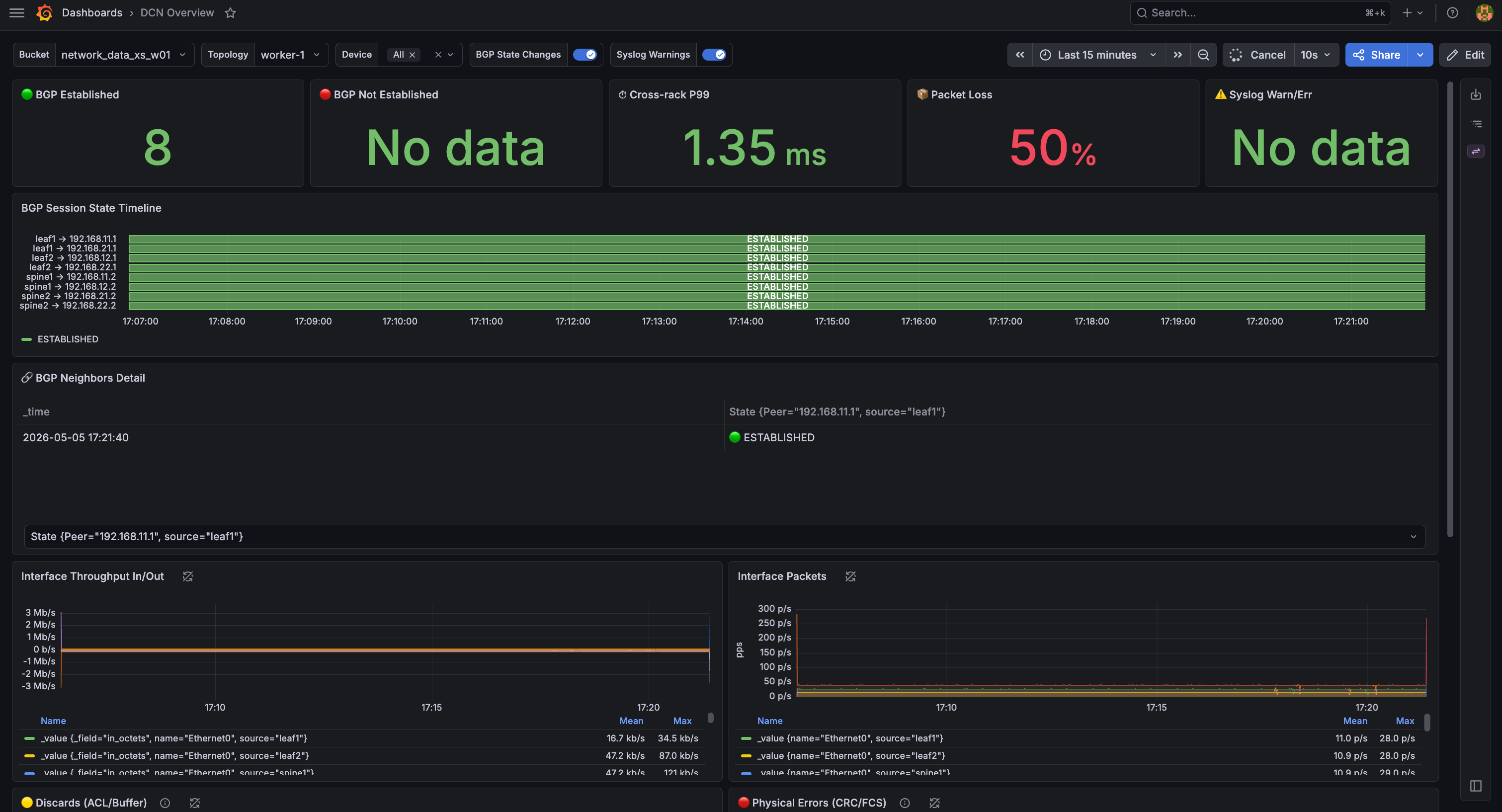
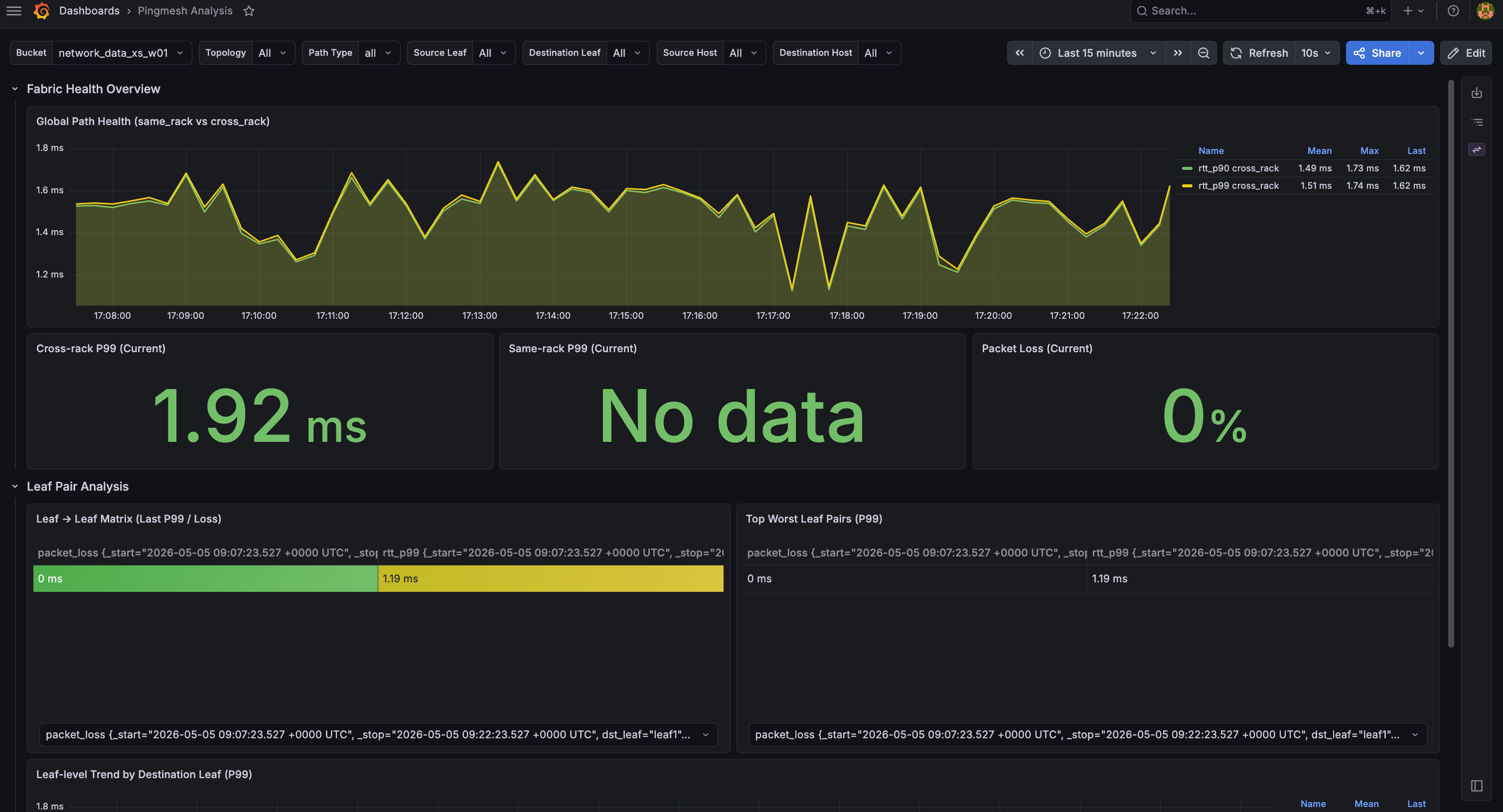
Common states
| Symptom | Likely cause | Action |
|---|---|---|
| No data in every panel | Wrong bucket or no active runtime | Select network_data_{scale}_w{n} or start a runtime. |
| No same-rack P99 on XS | XS has two racks with one client per rack | Use cross-rack panels on XS. |
| Packet loss spikes during a scenario | Fault episode is active | Expected during the observation window. |
| Packet loss remains after recovery | Cleanup or recovery may not have completed | Inspect scenario logs and preserved runtime state. |
| BGP panels show non-established peers | Startup convergence or control-plane disruption | Check the scenario window and device logs. |
| Telegraf data appears late | Scrape interval and startup lag | Wait about 30 seconds, then inspect Telegraf logs. |
Preserve a runtime
Automatic examples tear down the runtime after the report is collected. examples/05_manual_runtime.py keeps a runtime alive:
PYTHONPATH=. python examples/05_manual_runtime.py --repo-root .The script provisions a runtime and runs a scenario through the existing-runtime API:
runtime = bench.runtimes.provision(scale="xs", workers=1, name=runtime_name)
run = bench.sessions.run_on_runtime_scenario(
    scenario=scenario,
    runtime=runtime,
    agent=agent,
    artifacts_dir=artifacts_dir,
)
Because the runtime is caller-owned, it remains active until explicit teardown.
Useful checks:
sudo containerlab inspect -t lab-topology/generated_topology_xs/dcn.clab.yaml
docker ps | grep clab-dcn
docker ps | grep -E "influxdb|telegraf|grafana"
docker logs telegraf | tail -20
Reproduce observability manually
Manual deployment is for debugging the observability stack outside an SDK-managed run.
# 1. Generate and deploy an XS topology
bash scripts/runtime/deploy.sh xs lab-topology

# 2. Point tooling at the active topology
export NETOPSBENCH_TOPOLOGY_DIR="$PWD/lab-topology/generated_topology_xs"
deploy.sh generates topology metadata, renders Telegraf config, starts InfluxDB / Telegraf / Grafana, and starts the native Pingmesh and background-traffic processes in each client.
The default client image is pinned by digest. A custom client image must provide
/usr/local/bin/netopsbench-client-agent; runtime preparation fails explicitly
when the binary is absent.
Common overrides:
export NETOPSBENCH_MGMT_SUBNET=172.31.250.0/24The default SONiC image and the observability containers are pinned by digest.
The generated gNMI contract uses 50051, admin, json_ietf,
COUNTERS_DB, and a 10-second sampled subscription. Runtime-owned InfluxDB
buckets retain raw telemetry for seven days; attaching an existing
user-managed bucket never changes that bucket's retention policy. The default
standalone netopsbench bucket is also initialized with seven-day retention.
Successful runtime teardown deletes only the exact bucket recorded as created for that runtime by the current workspace. This prevents a same-name runtime from reading stale telemetry. Existing user-managed buckets are never adopted or deleted.
Cleanup
Xlarge and Fat-tree labs can consume substantial CPU, memory, container, and telemetry capacity. Start with one worker, inspect docker stats, host memory and pressure, and confirm one complete baseline before increasing concurrency. Keeping a topology warm is useful for repeated experiments, but do not leave unused large workers running alongside a new campaign.
SDK-visible runtimes:
netopsbench runtime list
netopsbench runtime show <runtime-name>
netopsbench runtime teardown <runtime-name>
netopsbench runtime teardown --all
Prefer the exact runtime name. teardown --all is intended only when every runtime registered in the current workspace is owned by the caller; it is not a substitute for host-wide Docker cleanup. Do not use global docker system prune, broad container-name filters, or shared-network deletion on multi-user hosts.
Manual deployment teardown:
bash scripts/runtime/teardown.sh lab-topology/generated_topology_xsInfluxDB buckets can be inspected directly when debugging retained evidence:
sudo docker exec influxdb influx bucket list \
  --host http://localhost:8086 \
  --token "$NETOPSBENCH_INFLUXDB_TOKEN"